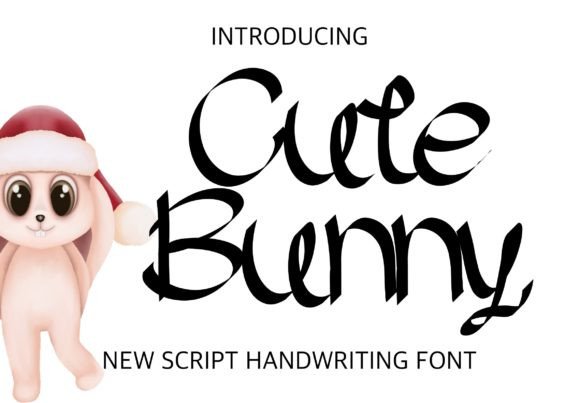
Cute Bunny: A Playful Handwritten Font for Editorial Charm
Choosing the Right Typeface for a Lifestyle Blog Redesign
As I sat down to refresh the header of a small but growing lifestyle blog, I knew the font choice would set the tone. The blog focuses on cozy home living, seasonal recipes, and mindful routines—so the typography needed to feel warm, inviting, and a bit whimsical. That’s when I discovered Cute Bunny, a soft and expressive handwritten font that brought a gentle personality to the blog’s new header without overwhelming the overall design.
Visual Character and Editorial Appeal
Cute Bunny is a charming script font with a slightly bouncy baseline and rounded letterforms. Its playful rhythm and open spacing give it a relaxed, approachable feel—perfect for lifestyle content that aims to feel personal and comforting. The font’s strokes vary subtly in weight, adding visual interest without sacrificing clarity. It’s not overly formal, yet it maintains a level of sophistication that works well in digital and print editorial settings.
What stood out during my layout tests was how Cute Bunny balanced legibility with personality. At larger sizes, it shines in titles, pull quotes, and section headers. Its character gives editorial layouts a handcrafted touch that feels authentic, especially for content aimed at women, families, or creative audiences.
Real-World Use in Newsletter Graphics and Chapter Openers
For a weekly newsletter I designed around seasonal wellness tips, I used Cute Bunny for the header graphic and introductory pull quotes. The font’s lightness and gentle curves made the content feel more personable and less clinical. I paired it with a clean sans serif for body text, which helped maintain readability while giving the newsletter a soft, curated aesthetic.
In a printable coaching workbook I was developing, Cute Bunny worked beautifully for chapter titles and decorative accents. It added a touch of warmth to the workbook’s structure without competing with the more structured fonts used for instructions and exercises. The font’s expressive nature made the content feel more encouraging and accessible, which aligned perfectly with the workbook’s purpose.
Readability and Layout Considerations
While Cute Bunny excels in display settings, I found it less suitable for long-form or small text. On screen, especially on mobile devices, its thinner strokes can become harder to read at smaller sizes. For print materials like workbooks or recipe cards, I made sure to use it only in titles or short phrases where its personality could shine without compromising clarity.
When designing a digital magazine layout, I used Cute Bunny sparingly—mainly for article titles and feature headers. It drew the reader’s eye effectively and helped establish a visual hierarchy, but I avoided using it in captions or subheadings where clarity was more critical. For those elements, I relied on a classic serif font that offered better readability in dense editorial contexts.
Font Pairing and Editorial Design
One of the most important aspects of using Cute Bunny in editorial design is thoughtful font pairing. Because of its expressive nature, it pairs best with more neutral, structured typefaces. In a recent wedding guide PDF I designed, I used Cute Bunny for the cover title and a soft serif font for the body text. This combination gave the guide a romantic, handcrafted feel while ensuring the content remained easy to read.
For a minimalist blog header redesign, I paired Cute Bunny with a modern sans serif for navigation menus and article summaries. This contrast helped maintain a cohesive yet dynamic visual identity across the site. The font’s versatility in tone—ranging from playful to elegant—allowed it to fit into a variety of editorial contexts as long as it was used thoughtfully.
Practical Considerations for Content Creators
Before incorporating Cute Bunny into any commercial project—whether it’s an ebook, a digital course, or a printable planner—it’s important to review its licensing terms. Many premium fonts, including Cute Bunny, offer commercial use rights, but creators should always confirm this before distribution.
From a technical standpoint, Cute Bunny includes multiple styles, ligatures, and alternates that add depth to editorial layouts. I appreciated the multilingual support when working on a bilingual recipe guide, and the available file formats made it easy to use across design platforms like Canva, Illustrator, and Photoshop.
For bloggers and digital creators, Cute Bunny is a valuable addition to your design toolkit—especially if you’re looking to inject warmth and personality into your headers, social media graphics, or newsletter visuals. Just remember to reserve it for display use, and always pair it with a legible secondary font to maintain balance and readability throughout your content.